
 Canada (English)
 Colombia
 Caribbean and Puerto Rico
 Ecuador
 India
 Indonesia
 Ireland
 Malaysia
 Mexico
 Panama
 Peru
 Philippines
 Singapore
 South Africa
 Sri Lanka
 Thailand
 United Kingdom
 United States

Gain earlier visibility and control to prevent issues from escalating.
QuickBooks Desktop
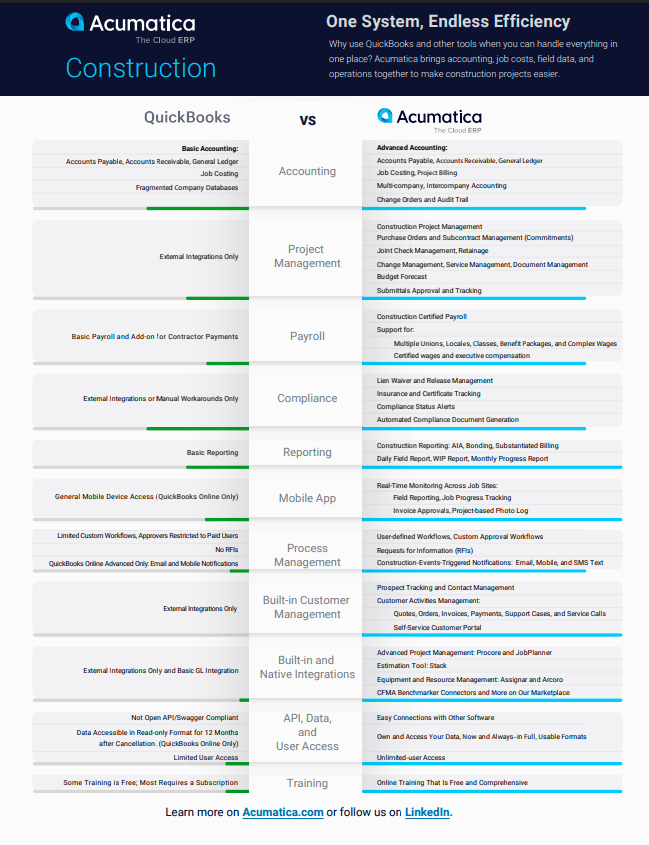
You manage financial information in QuickBooks, while field reporting, project updates, and collaboration may rely on separate applications and manual communication. Mobile access and notifications vary by QuickBooks product, and construction-specific field workflows often require additional tools.
Acumatica
Connect field and office teams in real time. Capture time, costs, documents, work orders, photos, and project updates from anywhere, with information flowing directly to finance and project teams. Connected workflows and alerts reduce missed handoffs, duplicate entry, and costly delays.
QuickBooks Desktop
You track job costs in the system, but current WIP, cost-to-complete, and projected final cost may require spreadsheets, custom reports, or manual reconciliation.
Acumatica
Bring job costs and forecasts together as work happens. Labor, materials, equipment, subcontractor costs, commitments, and change orders are reflected against budget, giving teams current WIP and cost projections to spot risk sooner and protect margins.
QuickBooks Desktop
You may use separate tools and manual processes to coordinate project documents, RFIs, submittals, subcontractors, purchase orders, inventory, and material availability.
Acumatica
Bring project, subcontractor, purchasing, and material information into connected workflows. Teams can reduce missed handoffs, identify shortages and cost changes sooner, and keep schedules and budgets aligned.
QuickBooks Desktop
You can manage invoicing and core accounting, but AIA billing, retainage, lien waivers, certified payroll, and compliance tracking may require add-ons or manual coordination.
Acumatica
Connect project costs, contracts, progress, approvals, and compliance directly to billing. This helps invoices go out accurately and on time, protects cash flow, and keeps complete records ready for audits and reviews.
Reduce manual work so teams can focus on higher-value priorities.
QuickBooks Desktop
You may collect field time, expenses, documents, photos, and project updates through separate applications, email, or spreadsheets, creating follow-up and repeated data entry.
Acumatica
Replace repeated field-to-office data entry with connected workflows. Field teams enter information once from any location, with updates flowing directly to project, job cost, billing, payroll, and financial processes so office teams stay current.
QuickBooks Desktop
You may rely on separate tools, manual calculations, and repeated verification before labor time reaches payroll, job costing, and compliance reporting.
Acumatica
Connect mobile time and expense entry directly to payroll, job costing, and compliance. This reduces manual calculations and corrections, speeds processing, and gives teams more current labor and project cost information.
QuickBooks Desktop
You may route time, expenses, purchase orders, change orders, and invoices through email or separate workflows, making follow-up time-consuming and exceptions harder to catch early.
Acumatica
Automate approvals, notifications, and exception alerts. Role-based workflows and complete audit trails shorten approval cycles and help teams act before cost, budget, or compliance exposure grows.
QuickBooks Desktop
You run financial and job reports in QuickBooks and may export data to spreadsheets to prepare WIP, forecasts, consolidated views, or month-end analysis.
Acumatica
Bring financial and project performance into one connected view. Current dashboards, WIP, forecasts, margins, and cash flow reduce spreadsheet-based reporting, while AI Insights surface trends, anomalies, and exceptions so teams can act sooner and close faster.
Support more projects and complexity without adding the same level of overhead.
QuickBooks Desktop
QuickBooks Desktop lacks AI-powered capabilities designed to automate routine work and surface insights within everyday workflows, leaving teams more reliant on manual processes and making it harder to scale efficiently as the business grows.
Acumatica
Bring AI and intelligent automation into the workflows teams already use. Acumatica continues to expand AI across financial, project, field, and operational processes to surface risks, automate routine work, and support faster decisions as the business grows.
QuickBooks Desktop
As companies, branches, or business units grow, you may maintain separate QuickBooks files and combine results manually for intercompany activity and consolidated reporting.
Acumatica
Manage multiple entities in one connected environment. Automated intercompany transactions and consolidated financial and project reporting provide visibility across companies, branches, departments, and locations.
QuickBooks Desktop
As more employees need information, limited access and separate processes can create bottlenecks, while finance remains responsible for distributing reports and validating data.
Acumatica
Give more employees direct access without sacrificing financial oversight. Unlimited users can access the information and workflows relevant to their roles, supported by permissions, standardized processes, and configurable controls.
QuickBooks Desktop
As project volume, users, and complexity increase, growth may require more spreadsheets, add-ons, or separate applications to handle new processes.
Acumatica
Scale projects, entities, locations, and business models on one cloud platform. Connect existing construction applications and add new capabilities without fragmenting data or rebuilding core processes.