
 Canada (English)
 Colombia
 Caribbean and Puerto Rico
 Ecuador
 India
 Indonesia
 Ireland
 Malaysia
 Mexico
 Panama
 Peru
 Philippines
 Singapore
 South Africa
 Sri Lanka
 Thailand
 United Kingdom
 United States
 AcumatiCares



As a growing small or midsized business (SMB) debating the merits of cloud ERP vs. traditional ERP (or on-premises ERP), you need to know what differentiates them. This includes understanding:
- How they’re deployed.
- How much they cost.
- How updates happen.
- How accessible they are.
You should also understand their scalability factor, their security and integration capabilities, and, ultimately, their agility in an evolving marketplace.
It’s a lot to consider, so we’ve provided a thorough comparison guide to help you out.
What Is the Difference Between Cloud ERP vs. On-Premises ERP?
A Cloud ERP system is enterprise resource planning software available through servers that connect directly to the internet. As Software as a Service (SaaS), cloud ERP empowers you with every day, 24/7 access whether you or your team members are sitting in an office, stalled in traffic, working in the field, or traveling across international borders. It’s a solution that’s hosted, maintained, and secured by the vendor to whom you pay a subscription.
A traditional, on-premises ERP system is software that’s purchased outright through a perpetual software license and installed on physical servers owned by your business. You, along with your IT pros, install, manage, and secure the complex system. Any customizations or essential updates go on your to-do list, and remote access, while possible, requires additional applications or devices, such as a Virtual Private Network (VPN).
Cloud ERP Vs. Traditional ERP at a Glance
The table below gives an overview of how cloud ERP solutions and traditional, on-premises ERP software differ in key areas.
| Area | Cloud ERP | Traditional, On-Premises ERP |
| Deployment | SaaS hosted on secure platforms (e.g., AWS), private cloud, or hybrid deployment | Company buys, installs, and runs its own servers and databases |
| Costs | No hardware or infrastructural costs for SaaS; lower IT costs | Upfront hardware and infrastructure costs, plus consistent maintenance work and increased internal IT staff to manage that work |
| Updates | Vendor-managed software, infrastructure, and security updates with SaaS | Each upgrade and customization planned, funded, and tested internally |
| Accessibility | Browser and mobile app access from any internet-connected device | Built for in-office corporate network, with remote access often requiring VPN or virtual desktops |
| Scalability | No penalty for growth. Easily adjust resources and add applications as volume grows, with unlimited users depending on the vendor | New hardware, more user licenses, and more IT staff members required as company grows |
| Security | Role-based permissions, MFA, SSO, encryption, audit logs, and continuous monitoring | Direct control over data location, but company solely responsible for physical security, patching, and disaster recovery |
| Integrations | Open platform with REST and OData APIs, webhooks, and native connectors | Often relies on custom code, middleware, or point-to-point links that need rework after upgrades |
Key Cloud ERP Benefits Buyers Should Compare
When weighing the advantages and disadvantages of these differing ERP systems, note that they share a common purpose: to provide your organization with a business management solution that acts as a single source of truth, connecting your financial, sales, supply chain, inventory, and order data while automating and streamlining your workflows and ensuring you have updated, accurate information for making informed business decisions.
Though their foundational promise aligns, the gap between traditional and cloud ERP benefits is wide.
Deployment and IT Management
Deploying an ERP system can help connect and transform your operations, but it does take time. How much time depends on whether you choose a modern cloud ERP solution or traditional ERP software.
A typical cloud ERP solution can be deployed in three to six months for smaller, single-entity organizations and potentially nine months for those with more complex, multi-entity needs. In comparison, on-premises ERP deployments, which involve purchasing, configuring, and installing hardware along with customizing, securing, and testing the software with that hardware, can take upwards of six to 12 months and up to 24 months for larger, multifaceted organizations.
The differences in deployment are also seen in IT management. Where a cloud ERP deployment relies on the vendor and implementation partner to manage IT needs, from hardware and data servers to system upgrades and security, an on-premises ERP deployment requires a full-time, fully trained IT team to keep the solution running optimally, ensuring there are no glitches that could pause operations.
Costs and Upgrade Requirements
Pricing is another notable difference between cloud ERP and traditional ERP systems. A cloud ERP deployment doesn’t require upfront infrastructure costs, relying instead on monthly payments to the vendor. Additionally, cloud ERP users do not have to pay for an internal IT team to manage updates to the software. Upgrades are included in the subscription cost, and customizations, which may require additional fees, are routinely handled by IT professionals outside your organization. With traditional, on-premises ERP software, infrastructure, customization, and ongoing maintenance are your internal teams’ responsibilities.
Scalability and Remote Access for Growing Businesses
As a business, your primary goal is to grow your profit. Growing your profit means growing your business, and, to do that, you must have adaptable technology. A cloud ERP solution fits that bill.
Cloud ERP solutions allow you to:
- Increase users, data, and capacity easily, only requiring you to notify your vendor and amend your subscription plan when these increases move you beyond your current subscription tier.
- Expand your capacity and transaction volume without adding new servers or IT team members.
- Add new branches or subsidiaries without complex integrations.
The inherent ability to access your cloud ERP solution and companywide data from wherever you are, whenever you need to, without third-party tools, is an additional benefit that helps you scale quickly and affordably.
Integration and Customization
One of the key benefits of implementing cloud ERP is the solution’s open infrastructure, which is designed to integrate seamlessly with needed or desired external applications without the assistance of IT experts. The same goes for customizations. Unlike traditional ERP, cloud ERP solutions are built with the ability to extend via APIs. Their capabilities can be personalized using workflow configuration engines, low-code/no-code tools, and a configurable UI and dashboards, eliminating time-consuming, manual interventions.
Security and Business Continuity
While easy deployment, limited internal IT management, lower costs, automatic upgrades, scalable technology, remote access, seamless integrations, and simplified customizations are powerful cloud ERP benefits, they’re meaningless if the solution isn’t secure. And if the solution isn’t secure, business continuity isn’t ensured. Fortunately, cloud ERP vendors are tasked with (and paid to handle) the safety of your system.
How does this work?
Most cloud ERP solutions are hosted on secure platforms (e.g., Amazon Web Services [AWS]), which secure physical data centers, hardware, software, and networking while also providing industry regulation tools. The cloud vendors build on the platforms’ security with continuous monitoring, penetration testing, and regular data backups. The system also empowers you to easily set your own internal controls, such as role-based data access restrictions and multifactor authentication (MFA). Additionally, it’s important to vet your third-party integrations before connecting them to your ERP system, which is why some ERP vendors, like Acumatica, offer Marketplaces of ISV solutions where certain pre-vetted software is listed as “certified” or “fulfilled by” the vendor.
Proactively safeguarding your business from malicious activity and actors through a trusted cloud vendor and your own actions will keep your operations running continuously as well as smoothly.
How Acumatica’s Cloud-Native ERP Architecture Improves Agility and Supports Growing Businesses
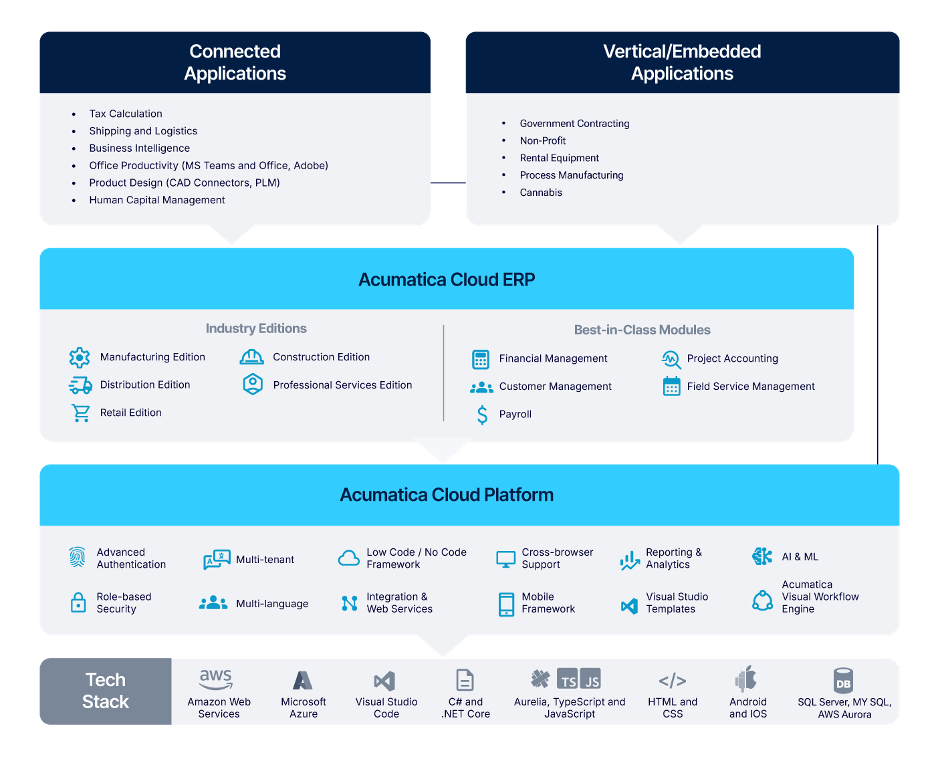
Acumatica is an AI-powered, scalable ERP system for growing businesses. As a cloud-native solution, Acumatica rests on an open platform with robust APIs that let you efficiently integrate all your systems, third-party applications, locations, users, entities, and any new operating models. It also offers flexible deployment options, real-time visibility, intelligent reporting and data insights, and industry-specific functionality, helping you become an agile business that can easily pivot when circumstances require—without hindering your continuity.
Legacy ERP Modernization: Is It Time to Replace Traditional ERP?
Understanding the key differences between cloud ERP and traditional ERP will help you decide if it’s time to make a change. Learning about other businesses that made the decision, like CW Home Depot, is helpful as well.
CW Home Depot, a one-stop-shop retail chain for construction, finishing, and furnishing materials in the Philippines, ran on a legacy ERP system. It couldn’t run transactions and reports simultaneously and experienced frequent outages during peak hours, which disrupted operations. Manual data extraction and reconciliation also caused issues, like slow decision making and limited visibility.
“Our legacy ERP [system] really struggled to keep up with the business,” says Catherine Co, Chief Information Officer and Head of Financial Audit. “We relied on several disconnected systems, so employees had to move between different applications just to find basic information.”
CW Home Depot decided to find a cloud-based ERP solution and selected Acumatica.
“We chose Acumatica,” Co explains, “because it gave us a modern, connected platform that could grow with us. It offers real-time visibility, supports unlimited users, and includes powerful capabilities like CRM, financial management, generic inquiry, and API integrations.”
With Acumatica, CW Home Depot:
- Eliminated manual tasks.
- Accelerated approvals.
- Empowered vendors with a live portal.
The team also reduced overtime, improved productivity, and unified inventory visibility across branches with real-time dashboards and automated workflows.
“Today, Acumatica automates document creation and manages the approval workflow inside the system,” Co says. “What used to take up several hours now takes less than a minute, and it’s all driven by real-time, accurate data.”
Moving from traditional ERP software to an agile, scalable, and AI-centric ERP solution that was born in the cloud transformed CW Home Depot from a struggling business into a thriving one. If you’d like to experience the same transformation, request a demo today.


