 Canada (English)
 Colombia
 Caribbean and Puerto Rico
 Ecuador
 India
India
 Indonesia
 Ireland
 Malaysia
 Mexico
 Panama
 Peru
Peru
 Philippines
 Singapore
 South Africa
 Sri Lanka
 Thailand
 United Kingdom
 United States
 AcumatiCares

A Simple Guide to Invoice Templates
What makes a business successful? Often, success is defined as profitability. Profitability is the result of working hard to make customers happy, creating a loyal customer base in the process.
A big part of creating that loyal customer base is managing and tracking invoices efficiently and accurately. This helps you keep up with the money that flows into your business, allows you to be transparent with your customers about what they are paying for, and reveals who your returning customers are, so you can invest in building relationships with them.
While invoicing can be challenging, using templates can simplify the process. And technological advancements, like invoicing software, make it even easier.
Today, we’ll explore what invoice templates are, how they can help you secure on-time payments from your customers, and what sophisticated invoicing software, such as an enterprise resource planning (ERP) solution, can do to transform invoicing from a chore to an opportunity.
What is an Invoice Template?
An invoice template is a pre-formatted, customizable document used by businesses to request payment for goods or services. These templates provide a standardized structure for essential billing details, such as line items, payment terms, and contact information, allowing companies to issue professional customer invoice templates efficiently without creating them from scratch.
Why accurate invoicing matters for growth
Success is often defined by profitability, which is the result of working hard to make customers happy. A major part of creating a loyal customer base is managing and tracking invoices efficiently. Clear, accurate custom invoice templates help you:
- Keep up with the money flowing into your business.
- Maintain transparency with customers regarding what they are paying for.
- Identify returning customers so you can invest in building relationships with them.
Designing Your Invoice Template:
What should be included in a custom invoice template?
When creating a functional and professional invoice template, businesses typically choose between PDF, Word, and Excel formats.
- PDFs: Preferred for security, as they can be encrypted and preserve formatting across devices.
- Word and Excel: Offer greater flexibility for editing and are useful for creating simple accounting invoice templates, though they are more prone to formatting errors.
Key Elements of a Professional Invoice
Regardless of the format, effective custom invoice templates must include the following details to ensure clarity and prompt payment:
- Label: the word “Invoice.”
- Contact Info: your business’s name, address, phone number, and email address.
- Customer Details: your customer’s name, address, phone number, and email address.
- Tracking: a unique invoice number for tracking payments and managing overdue invoices.
- Dates: the transaction date, invoice sent date, and payment due date.
- Line Items: a description of the product or service via line items.
- Financials: a clear statement of how much money is due—including taxes, delivery fees, and discounts.
- Payment terms: accepted payment methods and deadlines
Designing for Clarity and Brand Consistency
Design-wise, your invoice should be a simple document that prioritizes necessary details. Clean-looking and easy-to-understand invoices reduce customer confusion, helping you avoid delayed payments and improve cash flow.
However, “simple” doesn’t mean devoid of marketing. Your templates should feature your business logo and consistent branding. This consistency grows brand awareness and builds trust with your clients.

Creating Invoice Templates with an ERP Solution
So, you’ve chosen your design, decided what format to use, and know what information you need to include. But where do you go from here?
Manual Templates vs. Invoice Template Software
While manual templates (Word, Excel) offer flexibility, they are often employee-intensive and error-prone. Invoice template software within an ERP solution creates a centralized, automated workflow that reduces errors and saves valuable time.
| Comparison Point | Manual Invoicing | ERP Invoicing |
|---|---|---|
| Process Speed | Time-consuming; requires manual entry for every transaction and individual document creation. | Highly Efficient: Automates invoice creation by instantly pulling real-time data, eliminating redundant tasks and speeding up billing cycles. |
| Accuracy & Error Rate | Prone to human error during data entry, calculations, and formatting, which can lead to payment delays. | Precision Driven: Leverages AI and machine learning to ensure data accuracy, utilizing centralized data to automatically populate fields and reduce mistakes. |
| Data Integration | Disconnected; often requires searching across multiple applications or physical files to gather customer and pricing details. | Fully Integrated: Connects directly to your centralized data, accessing real-time customer details, pricing, and tax calculations instantly. |
| Security | Lower security; standard file formats like Word or Excel are vulnerable to unauthorized edits or loss. | Secure & Compliant: Offers robust security features, tax compliance tracking, and reliable storage within the cloud ERP environment. |
| Scalability | Becomes difficult to manage as transaction volume grows; often creates bottlenecks. | Growth Ready: Designed to scale effortlessly with your business, handling increased volume without adding administrative overhead. |
Key Features to Look for in Invoice Software
As you evaluate options, prioritize features that drive efficiency and compliance:
- Automated Tax Compliance: Look for software that automatically updates tax rates based on customer location.
- Real-Time Integration: The tool should sync instantly with your inventory and CRM to prevent billing for out-of-stock items.
- Recurring Billing: For subscription models, automation is a must to eliminate manual monthly entry.
- Multi-Currency Support: If you operate globally, your software must handle currency conversion seamlessly.
How Acumatica Streamlines Invoicing
Acumatica delivers accounting automation software that streamlines invoice creation with an automated generator and automatic formulas. Acumatica also provides records storage, tax calculations, bill payments, payroll management, and more within a single, centralized solution. This comprehensive approach ensures that all aspects of your invoicing process are managed efficiently and accurately.
Invoice Template Configuration settings in Acumatica
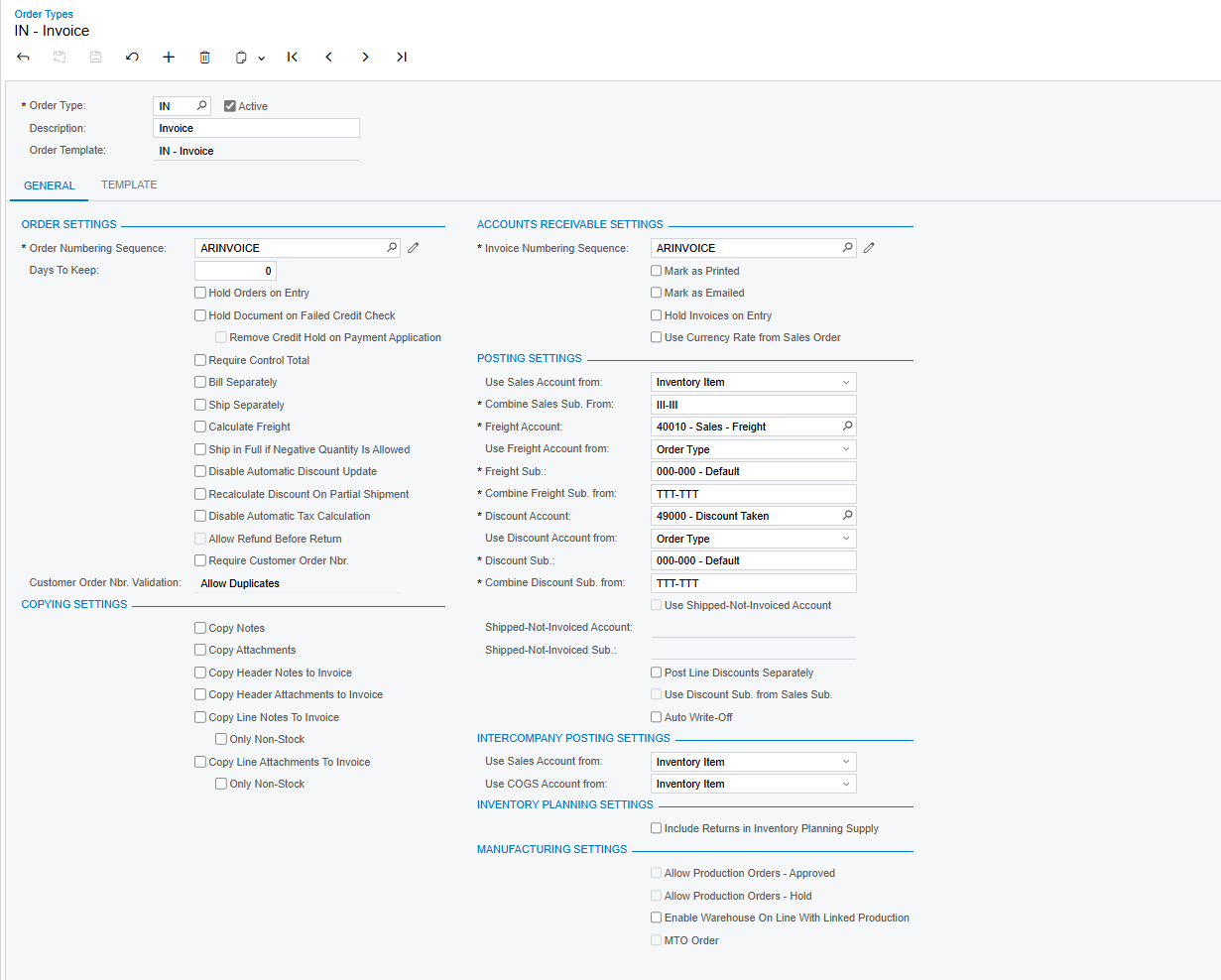
Instead of you having to manually search multiple, disconnected applications for each customer’s invoice information, Acumatica:
- Centralizes Data: automatically pulls appropriate and real-time information (customer details, pricing, tax calculations) to populate the invoice.
- Leverages AI/ML: with native artificial intelligence (AI) and machine learning (ML) capabilities, it properly formats documents and predicts needs.
- Adjusts: should you need to customize one or many records, Acumatica enables you to do that too.
- Optimizes: the software eliminates the need to manually search multiple, disconnected applications, resulting in faster turnarounds and improved customer service.
Conclusion
Invoice templates are an essential tool for businesses, and software, like Acumatica, makes business easier by helping you create visually appealing and concise documents while streamlining and automating the entire billing process. This goes a long way towards helping you earn your customers’ trust and approval.
Says Acumatica customer Tammy Raub, CFO, Mozaic, “Our contacts are in the system, and we can email invoices, eliminating double entry. We are in the process of converting billing spreadsheets to direct key-ins by the departments, and we know our aging buckets now, which were difficult to figure out in the old system.”
She adds, “Every time we do a weekly receivable billing, we put an invoice into Acumatica, and that allows us to know if there are any billings outstanding. We know that we haven’t received them by looking in Acumatica and seeing what’s outstanding. So that helps us with our aging and collections.”
Frequently Asked Questions
Q: What is the difference between an invoice template and a receipt?
A: An invoice template is a request for payment sent before the customer pays, while a receipt is a proof of payment issued after the transaction is complete.
Q: Can I use Excel for custom invoice templates?
A: Yes, Excel is a common tool for creating custom invoice templates because it handles calculations automatically. However, as transaction volume grows, manual entry in Excel can lead to errors, making dedicated invoicing software a safer choice.
Q: Why are PDF invoice templates often preferred over Word or Excel?
A: Businesses often prefer PDFs because they can be easily encrypted and password-protected for security. Additionally, PDFs preserve the exact formatting of the document, ensuring it looks professional on any device, whereas Word or Excel files can sometimes display formatting errors.
Q: Why should I use invoice template software instead of manual templates?
A: Invoice template software automates data entry, reduces human error, tracks payments in real-time, and ensures tax compliance, which is difficult to manage with manual templates.
Q: Can I customize invoice templates in an ERP system?
A: Yes, modern ERP systems like Acumatica allow for extensive customization of invoice templates. You can tailor specific records, adjust layouts to fit brand guidelines, and configure automatic data population to suit different customer requirements.
Q: How does invoice template software help with compliance?
A: Invoice software helps ensure compliance by automatically applying the correct tax calculations and maintaining a secure, unalterable digital trail of all transactions. This reduces the risk of human error during audits and financial reporting.