What are the main ERP modules?
ERP modules are connected software applications that manage specific business functions, such as accounting, purchasing, inventory, manufacturing, and customer relationships. Each module supports the employees responsible for that work while sharing relevant records with other parts of the business.
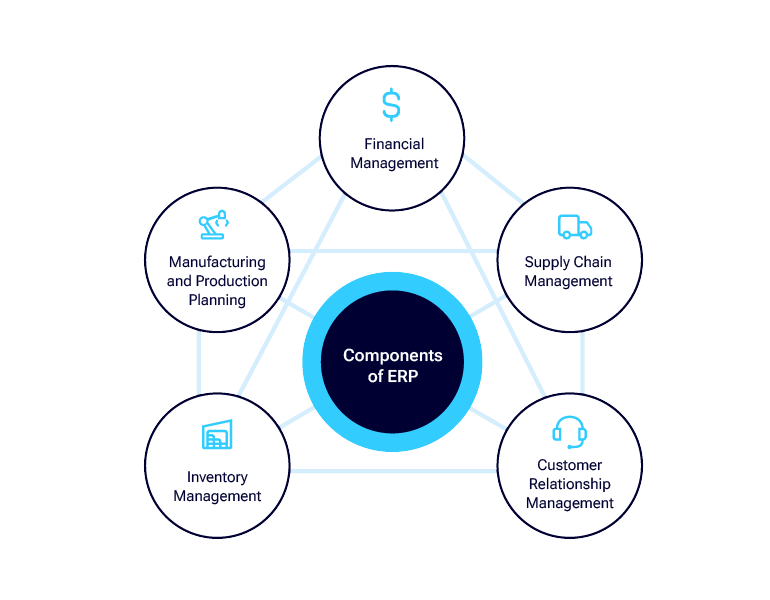
The value of ERP comes from how these modules work together. For example, a customer order can connect sales order management with inventory, fulfillment, and financial management. Teams can follow related transactions across departments, reducing duplicate data entry and making it easier to understand how operational activity affects financial results.
Most businesses select ERP modules based on their current needs and future plans. A distributor may prioritize inventory, purchasing, and order management, while a manufacturer may also need material requirements planning and production management. A construction company or professional services firm may focus on project accounting, time tracking, and billing.
Acumatica offers financial and operational applications alongside capabilities for specific industries. The appropriate combination depends on the organization’s workflows, reporting requirements, and integration needs. During evaluation, businesses should confirm which capabilities are included in the proposed solution and which require additional applications, configuration, or integrations.
The table below outlines common ERP modules, the activities they support, and the business questions they help teams answer.
| ERP module or capability |
What it helps teams manage |
Example business question |
| Financial management |
General ledger, payables, receivables, cash, and financial reporting |
What do we owe, what are customers paying, and how are we performing? |
| Purchasing |
Suppliers, purchase orders, receipts, and approvals |
What should we purchase, from whom, and when? |
| Inventory management |
Stock quantities, locations, movements, and replenishment |
What inventory is available across our locations? |
| Order management |
Customer orders, fulfillment, and related billing workflows |
Which orders are ready to ship? |
| Manufacturing |
Materials, production orders, scheduling, and production costs |
What resources are needed to complete production? |
| Project accounting |
Project budgets, costs, billing, and profitability |
How are actual project costs comparing with the budget? |
| Customer relationship management |
Prospects, opportunities, customer records, and interactions |
What is happening with this customer or sales opportunity? |
| Reporting and analytics |
Financial and operational performance |
Which results or exceptions need attention? |
What are the benefits of ERP?
ERP software helps businesses connect financial and operational activities, reduce repetitive work, and give employees access to consistent information. When purchasing, inventory, sales, and accounting share related records, teams can coordinate tasks and understand how decisions in one department affect another.
These benefits depend on more than the software. Accurate data, well-defined workflows, appropriate configuration, and employee training all influence the results. The table below explains common ERP benefits, how the system supports them, and the responsibilities businesses must manage to achieve them.
ERP benefits and what the business still needs to manage
| Potential benefit |
How ERP supports it |
What the business still needs to manage |
| Less duplicate data entry |
Connected applications reuse shared records |
Accurate master data and appropriate integrations |
| Better operational visibility |
Teams access related orders, inventory, projects, and financial information |
Timely transaction entry and suitable access permissions |
| More consistent workflows |
Configured rules support approvals and recurring activities |
Clear processes and exception handling |
| More efficient reporting |
Reports draw on connected business records |
Agreed definitions, reconciliations, and report configuration |
| Support for growth |
Additional capabilities can support changing requirements |
Capacity planning, training, and ongoing system ownership |
What are the limitations of ERP?
ERP requires an investment of time, budget, and employee involvement. Implementation may include cleaning and migrating data, connecting existing applications, configuring workflows, and training users. Complex requirements or extensive customizations can increase costs and make ongoing maintenance more demanding.
An ERP system also depends on the information employees and connected applications provide. Incomplete records, delayed transaction entry, or inconsistent processes can limit the reliability of reports. Automation can reduce repetitive tasks, but teams still need to manage exceptions, review results, and maintain appropriate controls.
When evaluating a solution such as Acumatica, businesses should test their priority workflows, confirm application and integration requirements, and establish clear implementation responsibilities. This helps align the proposed system with practical business needs and sets realistic expectations for the work involved.
What is an example of ERP software?
Acumatica Cloud ERP is an example of enterprise resource planning software designed for small and midsized businesses. It offers connected financial and operational applications, with industry capabilities for businesses such as distributors, manufacturers, construction companies, retailers, and professional services firms.
The following examples illustrate how businesses can use Acumatica. Available capabilities depend on the applications and configuration selected.
Distribution: connect stock availability with order fulfillment
A distributor can use Acumatica to connect inventory, purchasing, sales orders, warehouse activity, and financial records. This helps sales, warehouse, and finance teams work from related information when checking availability, fulfilling orders, and reviewing transactions.
ERP in practice: Sunshine Lighting improves inventory accuracy and reporting
Sunshine Lighting, a manufacturer and distributor of lighting products, relied on a legacy system, disconnected spreadsheets, and manual processes that made reporting difficult and limited operational visibility.
The company implemented Acumatica Distribution Edition to connect its financial and operational information and automate manual workflows. According to its published customer story, Sunshine Lighting increased inventory accuracy from 40% to more than 90% and reduced the time needed for KPI reporting and month-end closing by 50%.
This example shows how connected ERP applications can help inventory and finance teams work with more reliable information while reducing time spent preparing reports.
Read the success story
Manufacturing: connect production activity with costs
A manufacturer can use Acumatica to connect bills of material, materials, production orders, labor, inventory, and costs. This gives production and finance teams a shared view of the resources used to make products.
ERP in practice: POLYWOOD connects manufacturing and financial operations
POLYWOOD, a manufacturer of outdoor furniture made from recycled plastic, faced growth challenges with a legacy ERP system and manual processes. Employees relied on spreadsheets for scheduling and struggled to locate inventory and keep orders moving efficiently.
The company adopted Acumatica Manufacturing Edition and connected it with its custom manufacturing execution system through Acumatica’s API. This helped bring operational information together and give employees access to current business data.
According to its published customer story, POLYWOOD reduced inventory carrying costs by 15% and shortened its financial close by three days. Its experience illustrates how connected manufacturing, inventory, and financial information can support both operational efficiency and financial reporting.
Read the success story
Construction: connect project activity with financial performance
A construction business can use Acumatica to connect project budgets, job costs, time, expenses, and financial information. This helps field and office teams understand how project activity affects costs and profitability.
ERP in practice: Curran Young connects construction projects and financial management
Curran Young Construction needed a connected business management platform to support its growth and give employees access to information from the office and job sites.
The general contractor implemented Acumatica Construction Edition to support financial management, job costing, project management, and contract and change order management, while connecting with specialized tools such as Procore. Mobile access allowed authorized employees to check project information and address vendor payment questions without returning to the office.
In the published case study, President and Co-Founder Bruce Young reported saving 30–35% of his time through Acumatica’s integrated functionality. This example shows how connecting construction and financial workflows can reduce time spent switching applications and make project information more accessible.
Read the success story

 Canada (English)
 Colombia
 Caribbean and Puerto Rico
 Ecuador
 India
India
 Indonesia
 Ireland
 Malaysia
 Mexico
 Panama
 Peru
Peru
 Philippines
 Singapore
 South Africa
 Sri Lanka
 Thailand
 United Kingdom
 United States
 AcumatiCares